PRACTICAL LETTER PREPARATION
How to mail a letter without a printer.
Prepare a document online for print-and-mail fulfillment, or use a local printer when you need to handle the paper yourself. Your recipient’s instructions determine which option fits.
By Mail On My Behalf · Updated
Decide whether you need the paper in your hands.
If you already have a completed document and the recipient accepts a printed copy, an online print-and-mail service can arrange printing, an envelope, and postage. You supply the content and addresses, inspect the prepared pages, and approve the order.
Local printing is the better starting point if you must sign in ink after printing, enclose an original certificate, include a check you already hold, or physically inspect the paper. A digital upload cannot supply an original physical enclosure.
A third consideration is timing. An online order needs production before postal transit begins. If you have a deadline, verify the recipient’s requirements and choose a service that fits; a delivery estimate is not a guaranteed arrival date.
Option 1: prepare the letter online.
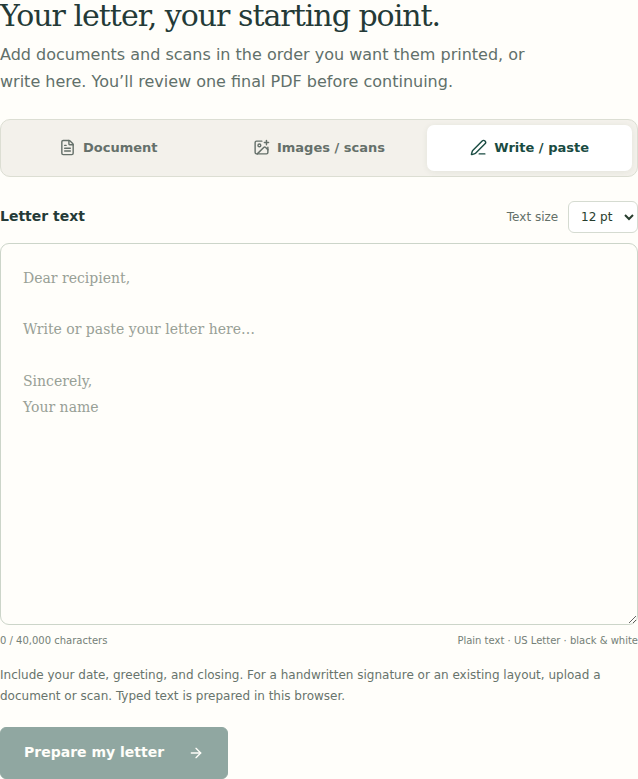
On Mail On My Behalf, upload a PDF, Word DOCX, JPG, or PNG, or write and paste text into the editor. Uploaded files are prepared automatically when selected. Typed text stays in your browser while you edit; creating the final print preview for a live order sends that text to our server to generate its PDF. Early access ordering is open. You can prepare and download your PDF before payment.
- Start with the final letter and any required visible signature. Add attachments in their intended printed order.
- Review the portrait US Letter preview. Check small text, scans, page breaks, and converted Word formatting.
- Enter a complete US recipient address and return address, including apartment or suite information.
- Compare the mailing service and available records. For online mailing, inspect the confirmed quote and saved document before paying.
One order covers one prepared document and one recipient. The mailing quote includes an address cover sheet. The payable total is the complete price for printing, the envelope, postage and our service. Existing quotes keep their saved amounts. Calculator estimates are not the confirmed payable quote.
For the preparation limits and image-quality controls, see the PDF preparation guide. Successful preparation does not establish that the document meets the recipient’s instructions.
Option 2: use a local printer.
A library, print shop, or office-service store may offer document printing. Check the location’s opening hours, accepted file formats, price, and collection arrangements directly before traveling. Availability differs by location.
Export a PDF to reduce layout changes between devices. Bring the complete document, then inspect the printout for missing pages, faint text, or clipped margins. Add any required ink signature and physical enclosures yourself.
You still need to address the envelope, arrange appropriate postage, and deposit or present it for mailing. If a specific postal receipt or service is required, check current USPS instructions rather than assuming ordinary stamp-and-mail preparation produces that record.
With either option, avoid uploading a sensitive document to an unfamiliar shared computer without understanding how files are retained. Keep your original document and the final copy you intend to mail.
Choose First-Class or Certified Mail deliberately.
Ordinary First-Class letters do not have the same item-level tracking as a package. Certified Mail is an extra service for eligible mail that provides a mailing receipt and access to delivery or attempted-delivery information.
A Return Receipt is a separate additional service for a delivery record that includes an available signature. Mail On My Behalf offers the electronic return receipt option with eligible Certified Mail, rather than a mailed-back green card.
A signed delivery record does not prove that the recipient read your letter or that its contents satisfy a legal requirement. Follow the recipient’s instructions or obtain appropriate professional advice when a particular service method matters.
Postal definitions: USPS Certified Mail and Return Receipt descriptions. Read our service comparison for the distinction between production progress and available postal evidence.
Check the address and keep the right records.
Confirm the recipient’s current mailing address from their own instructions. A suggested street address is not proof of deliverability, and an apartment number, department, or attention line can still be necessary.
Save the final document you approved, the order receipt, and any postal evidence separately. Payment shows that money was received; a production update shows fulfillment progress; a USPS scan concerns postal handling. None should be treated as interchangeable.
You can start preparing a letter now without a printer. Before paying for online mailing, confirm that ordering is available, your document is accepted for the selected service, and the exact price and records match your needs.
Your next step.
Prepare your document, check the printed pages, and confirm the recipient and return address. Review service availability and the price before approving a mailing.
Prepare a letterSee how pricing works · Compare Certified Mail options · Ask a preparation question